Archive
A process to find and extract data-points from graphs in pdf files
Ever since I discovered that it’s sometimes possible to extract the x/y values of the points/circles/diamonds appearing in a graph, within a pdf, I have been trying to automate the process.
Within a pdf there are two ways of encoding an image, such as the one below. The information can be specified using a graphics image format (e.g., jpeg, png, or svg), or it can be specified using a sequence of pdf’s internal virtual machine instructions.

After spotting an interesting graph containing data points, when reading a paper, the quickest way to find out whether the image is embedded in the pdf as an image file (the most common case) is to run pdfcpu (using the options extract -m image). If the graph is not contained in the image files extracted by pdfcpu, it may have been created using internal pdf commands (or be a format not yet support by pdfcpu).
Until recently, finding the sequence of internal pdf instructions used to visualise a particular graph was a tedious process. A few months ago, I discovered the tool pdfsyntax, which has an option to convert the pdf internals into a html page containing links between the various components (making it easy to go to a particular page and view the contents). However, pdfsyntax is still new, i.e., it regularly fails to convert a pdf file.
As distributed, pdf files are compressed. They can be converted to readable form using the command qpdf –stream-data=uncompress (images remain in their respective binary format). To locate the instructions that generate a graph, I search for a sequence of 3-4 characters appearing close to the graph in the displayed text (it is difficult to predict how words will be split for layout purposes, within a pdf). The instructions that generate the graph may appear later in the uncompressed file, with a named reference to these instructions appearing around this text (i.e., a pdf function call). LLM’s are great at describing the behavior of sequences of pdf instructions.
Why not grep uncompressed pdf files to find those containing the instructions used to generate graphs?
Surprisingly, apps that produce pdf files use a myriad of different instruction sequences to draw circles, diamonds, pluses, etc. While there is a pdf instruction to draw a circle, the most common technique uses four Bézier curves to draw each quadrant of a circle; a colored circle might be drawn by filling a specified area with a chosen color. The plus (+) symbol is sometimes drawn as a vertical line followed by a horizontal line (or the other order), and sometimes all the vertical lines are drawn followed by all the horizontal lines. Diamonds are created using four angled lines.
Fewer combinations of instructions are used to draw the values associated with the axis ticks, e.g., 10, 20, 30, etc.
The output from my script that searches pdf files for possible extractable data lists the line numbers of possible data points and possible tick labels, along with the totals for each. A graph will usually contain many points and 10+ labels. Lower totals usually suggest incidental matches.
If an appropriate instruction sequence is found, it is copied to a file, and a bespoke awk script (usually an edited version of a previous script) extracts the numeric values within the reference frame of the graph axis bounds. This extraction process first calculates the x/y coordinates of the center of the circle/diamond/plus, in the pdf frame, then calculates the x/y coordinates of the axis tick marks, in the pdf frame, then maps the x/y data points to the axis frame.
I’m not expecting the extraction of numeric values to have any degree of automation anytime soon. But then, this problem would make a great challenge for LLM coding apps…
When a graph is specified using an image format, WebPlotDigitizer is the extraction tool of choice.
Converting graphs in pdf files to csv format
Looking at a graph displayed as part of a pdf document is so tantalizing; I want that data as a csv!
One way to get the data is to email the author(s) and ask for it. I do this regularly and sometimes get the apologetic reply that the data is confidential. But I can see the data! Yes, but we only got permission to distribute the paper. I understand their position and would give the same reply myself; when given access to a company’s confidential data, explicit permission is often given about what can and cannot be made public with lists of numbers being on the cannot list.
The Portable Document Format was designed to be device independent, which means it contains a description of what to display rather than a bit-map of pixels (ok, it can contain a bit-map of pixels (e.g., a photograph) but this rather defeats the purpose of using pdf). It ought to be possible to automatically extract the data points from a graph and doing this has been on my list of things to do for a while.
I was mooching around the internals of a pdf last night when I spotted the line: /Producer (R 2.8.1); the authors had used R to generate the graphs and I could look at the R source code to figure out what was going on :-). I suspected that each line of the form: /F1 1 Tf 1 Tr 6.21 0 0 6.21 135.35 423.79 Tm (l) Tj 0 Tr was a description of a circle on the page and the function PDF_Circle in the file src/library/grDevices/src/devPS.c told me what the numbers meant; I was in business!
I also managed to match up other lines in the pdf file to the output produced by the functions PDF_Line and PDFSimpleText; it looked like the circles were followed by the axis tick marks and the label on each tick mark. Could things get any easier?
In suck-it-and-see projects like this it is best to use very familiar tools, this allows cognition to be focused on the task at hand. For me this meant using awk to match lines in pdf files and print out the required information.
Running the pdf through an awk script produced what looked like sensible x/y coordinates for circles on the page, the stop/start end-points of lines and text labels with their x/y coordinates. Now I needed to map the page x/y coordinates to within graph coordinate points.
After the circle coordinates in the output from the script were a series of descriptions of very short lines which looked like axis tick marks to me, especially since they were followed by coordinates of numbers that matched what appeared in the pdf graphs. This information is all that is needed to map from page coordinates to within graph coordinates. The graph I was interested in (figure 6) used logarithmic axis, so things were made a bit complicated by the need to perform a log transform.
Running the output (after some cut and pasting to removed stuff associated with other graphs in the pdf) from the first script through another awk script produced a csv file that could be fed into R’s plot to produce a graph that looked just like the original!
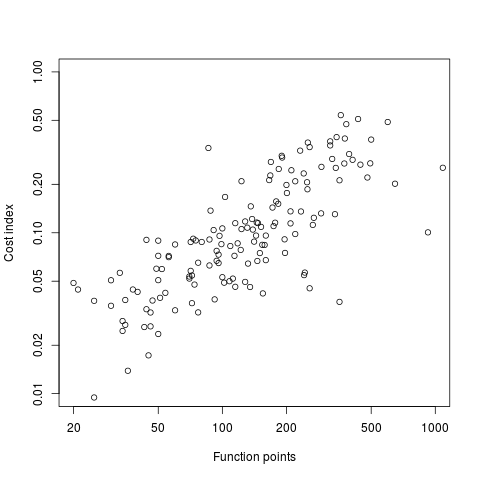
I would say it is possible to extract the data points from any graph, generated using R producing pdf or ps, contained within a pdf file.
The current scripts are very specific to the figure I was interested in, this is more to do with my rough and ready approach to solving the problem which makes assumptions about that is in the data; a more sophisticated version could handle common variations on the theme and with a bit of elbow grease point-and-click might be made to work.
It is probably also possible to extract data points in graphs produced by other tools, ‘all’ that is needed is information on the encoding used.
Extracting data from graphs generated to an image format such as png or jpg are going to need image processing software such as that used to extract data from images of tables.
Recent Comments